Codejock Controls Visual C++ MFC
Bộ control cho Visual C++ MFC bổ sung Buttons, Combo Box, Dialogs, Progress Bars, Tab Controls, Shell Controls và XAML Markup Support cho ứng dụng Windows.
- Bản quyền chính hãng
- Xuất hóa đơn VAT
Tương thích
Tính năng nổi bật
Cung cấp Buttons cho giao diện MFC với nhiều lựa chọn hiển thị.
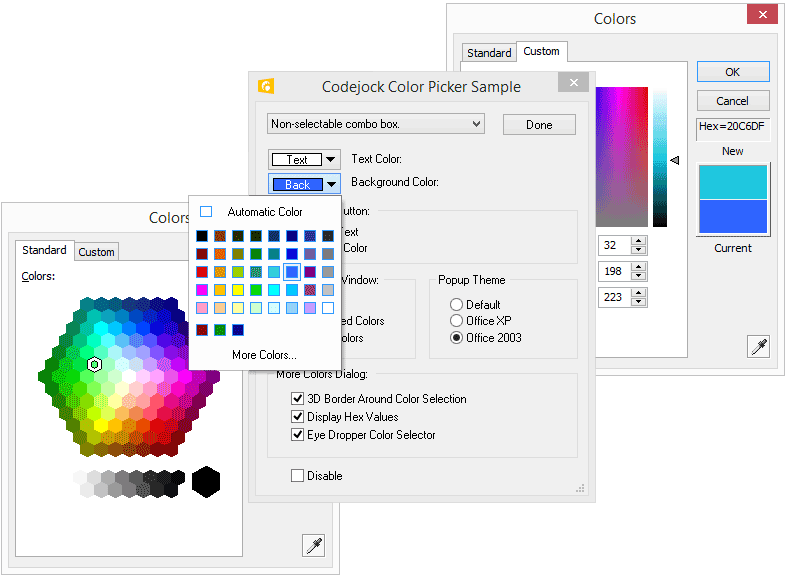
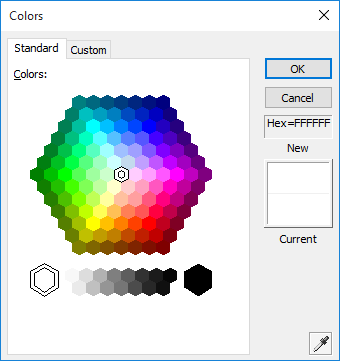
Bổ sung Color Picker và Color Selection cho tác vụ chọn màu.
Hỗ trợ Themed Combo Box và Auto-complete trong biểu mẫu nhập liệu.
Tích hợp Font Selection và Themed Dialogs cho hộp thoại ứng dụng.
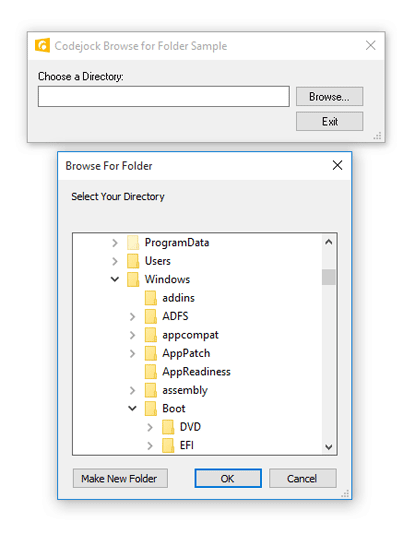
Thêm Browse for Directory để gọi hộp thoại chọn thư mục.
Hỗ trợ Resizable Layout Manager khi bố trí giao diện thay đổi kích thước.
Cung cấp MDI Windows, Excel Style MDI Windows và MDI Tab View.
Bao gồm List Manager và Search Options cho màn hình quản lý dữ liệu.
Trang bị Browse Edit, Hex Edit và Masked Edit cho nhập liệu chuyên biệt.
Bổ sung Edit List Box và Edit Control Themes cho nhóm edit controls.
Hiển thị Progress Bars và Themed Progress Bars trong tiến trình xử lý.
Tạo cửa sổ popup kiểu Messenger với hiệu ứng chuyển động, độ trong suốt và siêu liên kết.
Hỗ trợ Task Dialog và Windows Style Task Dialog trong ứng dụng desktop.
Cung cấp Themed Scroll Bars, Enhanced Tab Control và Tab Control Themes.
Tích hợp Windows Shell Explorer List and Tree cùng Tray Icon.
Hỗ trợ XAML Markup Support, Taskbar Manager Control và Registry Manager.
Tổng quan
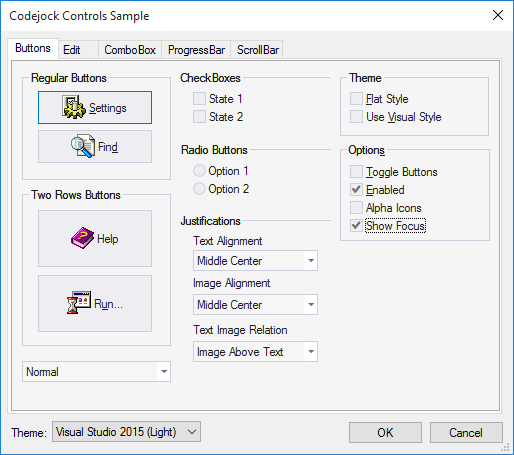
Codejock Controls Visual C++ MFC tập hợp nhiều thành phần giao diện sẵn sàng dùng cho ứng dụng Windows viết bằng Visual C++ MFC. Phạm vi thư viện trải từ Buttons, Combo Box, Common Dialogs, Progress Bars, Edit Controls đến Tab Controls, Shell Controls, XAML Markup Support và Taskbar Manager.
Phù hợp cho
Phát triển ứng dụng desktop Windows bằng Visual C++ MFC cần bộ control giao diện phong phú.
Nâng cấp phần mềm nội bộ với hộp thoại, edit control, thanh tiến trình và UI dạng tab.
Xây dựng ứng dụng MDI cần quản lý nhiều cửa sổ và tab theo phong cách Excel.
Tạo tiện ích hệ thống hoặc file manager với Windows Shell Explorer List and Tree.
Bổ sung popup cảnh báo, cửa sổ mẹo, biểu tượng khay hệ thống và control liên kết cho ứng dụng desktop.
Nhận báo giá theo nhu cầu
Chọn phương án bạn cần và số developer.
Bạn sẽ nhận được
- Giá chính thức theo số lượng và hình thức license
- Phản hồi qua email trong giờ làm việc
Thông số kỹ thuật
- Hãng
- Codejock Software
- Loại sản phẩm
- Thành phần C++
- Kiến trúc
- 32Bit, 64Bit
- Môi trường phát triển
- Visual Studio 2022, Visual Studio 2019, Visual Studio 2017, Visual Studio 2015, Visual Studio 2013, Visual Studio 2012, Visual Studio 2010, Visual Studio 2008 và 6 môi trường khác
- Loại thành phần
- DLL, VC++ Class Library, Static Link Library
- Nền tảng mục tiêu: Visual C++ MFC trên Windows.
- IDE / container tương thích: Visual Studio 2022 (Visual C++ 17), Visual Studio 2019 (Visual C++ 16), Visual Studio 2017 (Visual C++ 15), Visual Studio 2015 (Visual C++ 14), Visual Studio 2013 (Visual C++ 12), Visual Studio 2012 (Visual C++ 11), Visual Studio 2010 (Visual C++ 10), Visual Studio 2008 (Visual C++ 9), Visual Studio 2005 (Visual C++ 8), Visual Studio 2003 (Visual C++ 7.1), Visual Studio 2002 (Visual C++ 7), Visual Studio 6.0 (Visual C++ 6).
- Hệ điều hành triển khai: Windows 11, Windows 10, Windows 8.1, Windows 8, Windows 7, Windows Vista, Windows XP, Windows Me, Windows 2000, Windows 98 SE, Windows 98, Windows 95, Windows Server 2022, Windows Server 2019, Windows Server 2016, Windows Server 2012 R2, Windows Server 2012, Windows Server 2008 R2, Windows Server 2008, Windows Server 2003 R2, Windows Server 2003, Windows Server 2000, Windows NT 4.0.
- Phạm vi gói: Controls nằm trong Toolkit Pro for Visual C++ MFC.
- Tình trạng cung cấp: Codejock Controls Visual C++ MFC hiện chỉ có trong Codejock Toolkit Pro.
Câu hỏi thường gặp
Codejock Controls Visual C++ MFC dùng cho môi trường nào?
Bộ thư viện hướng tới ứng dụng Windows phát triển bằng Visual C++ MFC.
Có hỗ trợ 64-bit không?
32Bit và 64Bit.
Bộ thư viện có những nhóm control nào?
Các nhóm chính gồm Buttons, Combo Box, Common Dialogs, Progress Bars, Edit Controls, Alert Popup Windows, Themed Scroll Bars, Tab Controls, Shell Controls, XAML Markup Support, Taskbar Manager và nhiều control khác.

Codejock Toolkit Pro
Bộ UI component cho Visual C++ MFC gồm 11 thành phần như Ribbon, Docking Pane, Chart, Calendar, Report Control và Syntax Edit, hỗ trợ xây…

Codejock Suite Pro
Bộ component ActiveX COM cho Windows gồm 11 nhóm UI controls như docking pane, ribbon, chart, calendar, report và syntax editor. Phù hợp…

Xceed Business Suite for WPF
Bộ component WPF tập trung vào DataGrid, 3D views, listbox, editors, themes và UX controls cho ứng dụng Windows. Gói này hỗ trợ data…
Chưa chắc phương án nào phù hợp?
Cho chúng tôi biết nền tảng bạn đang dùng và số developer — chúng tôi đề xuất phương án tối ưu chi phí.