PHP Tools for Visual Studio
Extension cho Visual Studio bổ sung editor PHP, IntelliSense, debug với Xdebug, PHPUnit, Composer và triển khai remote. Hỗ trợ Visual Studio 2010-2022, gồm Community Editions.
- Bản quyền chính hãng
- Xuất hóa đơn VAT
Tương thích
Tính năng nổi bật
Bổ sung syntax highlighting và code folding cho mã PHP trong Visual Studio.
Phát hiện không khớp kiểu, lỗi gõ và thiếu tham số hàm ngay khi nhập mã.
Cung cấp IntelliSense theo ngữ cảnh với completion, tool tips và signature help.
Điều hướng tới định nghĩa và tham chiếu bằng các phím tắt quen thuộc của Visual Studio.
Hiển thị Code Lenses với tham chiếu, override, prototype và nơi dùng trait.
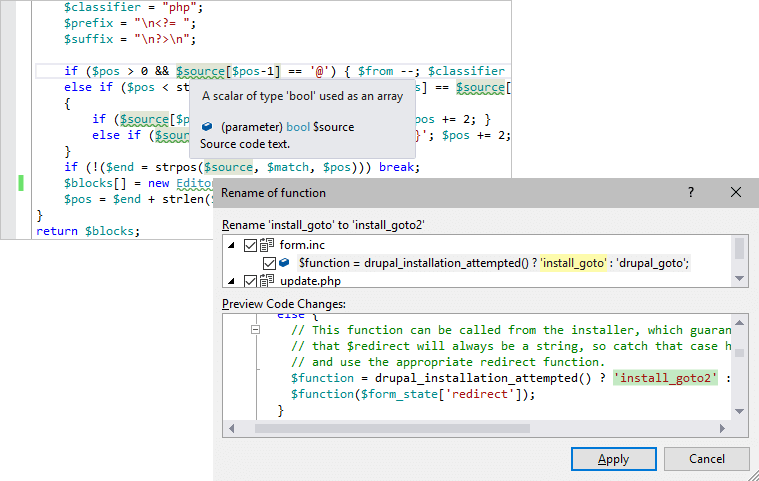
Đổi tên identifier bằng refactoring tại chỗ hoặc qua preview chi tiết.
Quản lý PHP binaries, Composer và dependencies theo phiên bản PHP của project.
Tự động format mã theo quy tắc Visual Studio và EditorConfig.
Áp dụng sửa nhanh, sắp xếp uses, sửa tên theo PSR và sinh PHPDoc.
Soạn và kiểm tra PCRE bằng RegEx Editor và Regex Tool Window.
Hỗ trợ Smarty Editor với syntax highlighting, error checking và snippets.
Hỗ trợ Twig templates với completion, outlining và split view.
Biên tập Blade với HTML, CSS, JS, Blade và embedded PHP trong cùng file.
Debug bằng Xdebug với breakpoints, call stack, theo dõi biến và Immediate Window.
Chạy và debug PHPUnit tests trong Visual Studio Test Explorer.
Triển khai incremental deployment qua FTP, SFTP, FTPS, File System hoặc Azure.
Tổng quan
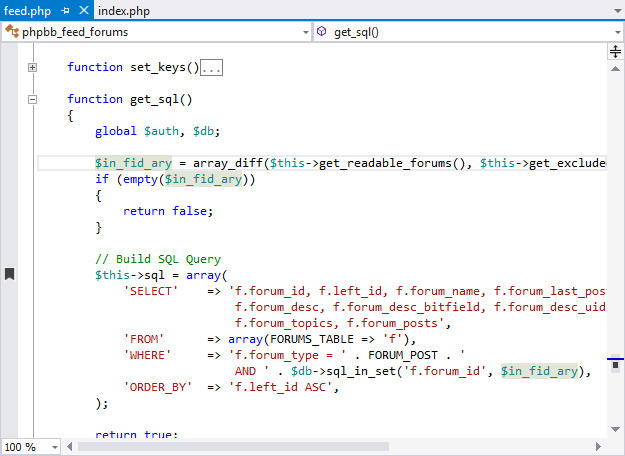
Visual Studio editing experience for PHP.
PHP Tools for Visual Studio mở rộng Visual Studio để phát triển PHP với editor chuyên biệt, IntelliSense, navigation và debug ngay trong cùng môi trường làm việc. Bộ mở rộng này cũng thêm PHP projects và hỗ trợ visual debugging cho PHP cùng JavaScript.
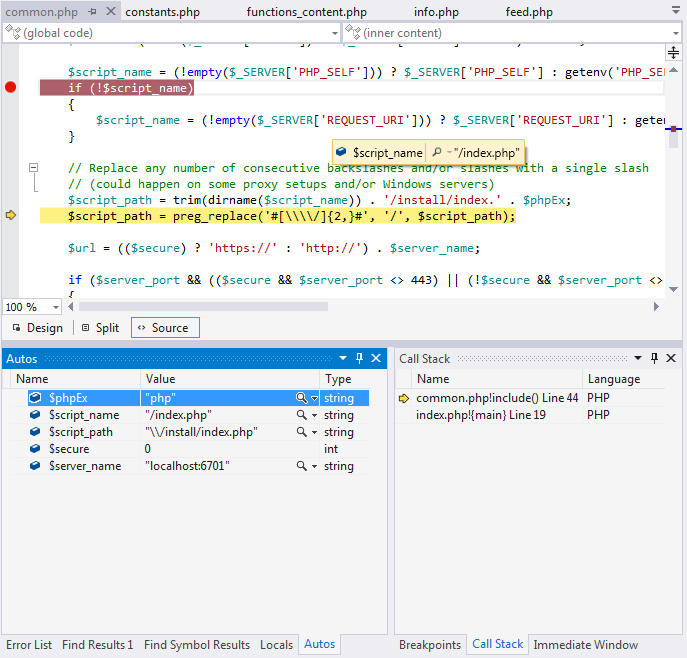
Debug PHP code in Visual Studio.
Trong quá trình viết mã, editor cung cấp tô màu cú pháp, thu gọn mã, kiểm tra mã theo thời gian thực, tooltip chi tiết, gợi ý chữ ký hàm và hoàn thành mã theo ngữ nghĩa. Các lỗi như sai kiểu, lỗi gõ, thiếu tham số hàm, class hoặc hàm không xác định có thể được gạch chân ngay khi đang gõ.
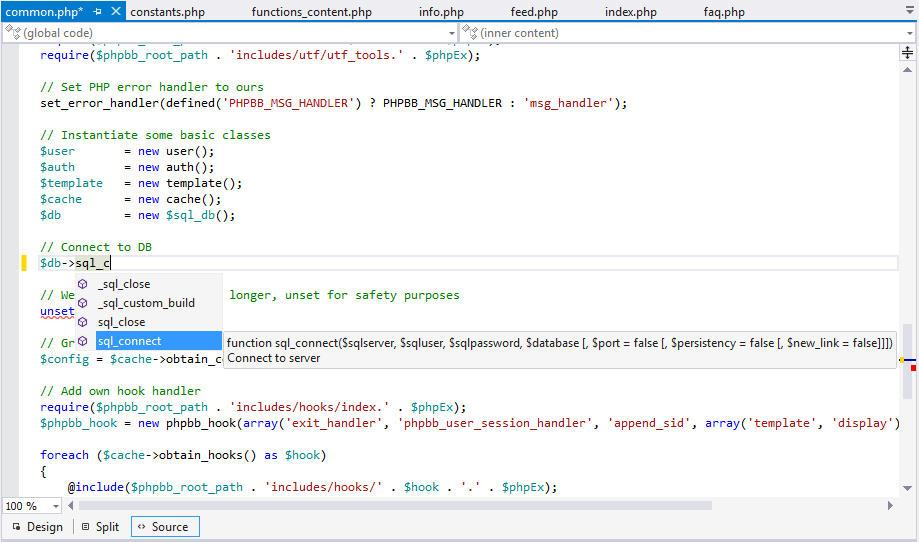
Smart dynamic code assistance.
Phù hợp cho
Lập trình viên PHP muốn làm việc hoàn toàn trong Visual Studio thay vì chuyển sang IDE khác.
Nhóm phát triển web cần debug ứng dụng PHP cục bộ và trên máy chủ từ xa bằng Xdebug.
Dự án Laravel cần gợi ý Blade, gập Blade, route, facade và gợi ý Livewire.
Nhóm QA hoặc developer cần viết, chạy và debug PHPUnit test cases trong cùng IDE.
Dự án cần publish file lên FTP, SFTP, FTPS, File System hoặc Azure từ Visual Studio.
Ước tính chi phí
Chọn số developer để xem chi phí tham khảo.
Từ 5 developer trở lên thường có giá tốt hơn.
Thông số kỹ thuật
- Hãng
- DEVSENSE
- Phiên bản
- 1.89.x
- Loại license
- Annual Subscription License
- Loại sản phẩm
- Add-in Visual Studio
- Môi trường phát triển
- Visual Studio 2022, Visual Studio 2019, Visual Studio 2017, Visual Studio 2015, Visual Studio 2013, Visual Studio 2012, Visual Studio 2010, PHP và 12 môi trường khác
- Hỗ trợ Community Edition. Không hỗ trợ Express Edition.
- Tính năng trình soạn thảo được liệt kê: Syntax Highlighting, Code Folding, RegEx Editor, Mixed HTML/JS/CSS, Inlay Hints, PHPDoc Support, Code Lenses, Highlight Occurences, Breadcrumbs and Code Structure, Highlight ToDo, Highlight Unused Imports and Variables, Smart Indent, Type Hierarchy.
- IntelliSense và phân tích được nêu: Semantic Code Completion, Starred Suggestions, Full Generics Support, Detailed Signature Help, Detailed Tool Tips, Auto-Import, Smart Snippets, Navigation to Definition, Navigation to References, Symbol Search across Workspace, Multi-language PHP Manual, Workspace-Wide Real-Time Analysis, Type Mismatch Analysis, Deprecations diagnostic, Unused Variables and Imports, RegEx Validation, Reachability Check, Method Override Validation, Abstracts Implementation Check.
- Refactoring và code action được liệt kê: Rename Refactoring, Quick Fixes, Code Actions, Implement Abstracts, Fix PSR Names, Organize Uses, Generate PHPDoc, Configure Auto-Fix on Save.
- Định dạng được liệt kê: Mixed Formatting Support, Fully Customizable Rules, Predefined Code Styles, EditorConfig Rules Definition, Batch Format entire Workspace, Format On Typing and On Saving, Format Selection.
- Hỗ trợ framework và templating được liệt kê: Laravel Magic, Laravel Idea ide.json Support, Eloquent Magic, Laravel Services and Facades and Routes, Components and Livewire Completions, Blade Completion, Blade Folding, PHP-in-Blade Full Editor Support, PHPStorm Meta Support, PHPStan Global Type Alias Support, PHAR Files Indexing and Navigation, Smarty and Twig Editor, Laravel and Blade Support, Composer Manager and IntelliSense, Generics and PhpStan and Psalm Support.
- Kiểm thử và profiling được liệt kê: PHPUnit Tests Explorer, Tests Debugging, Tests Profiling, Tests Results View, chạy test hoặc nhóm test đã chọn, profiling ứng dụng Web và Console, trực quan hóa hiệu năng và Hot Paths, Profiling Tests.
- Dự án và triển khai: Project-Wide Configuration, Run/Serve, Composer Integration, EditorConfig Configuration, MSBuild Support, Project From Composer Wizard, PHP Version Manager, Remote Explorer, Incremental Deployment, IIS/IIS Express Integration.
- Gỡ lỗi được liệt kê: Xdebug Integration, Xdebug Configuration Validation, Built-In Web Server, Debug Inline Adornments, Debug Expression Evaluation, Variable Watch and Edit.
- Phần gỡ lỗi từ xa có nêu hỗ trợ Windows server, Linux hoặc Mac.
Câu hỏi thường gặp
Composer và PHPUnit có được tích hợp trong Visual Studio không?
Có. Composer được tích hợp trong giao diện, MSBuild và Solution Explorer. PHPUnit tích hợp với Visual Studio Test Explorer để soạn, chạy và debug test case.

RemObjects Suite Subscription for .NET
Gói subscription cho phép theo kịp toàn bộ sản phẩm RemObjects.NET hiện tại và sắp ra mắt, kèm nhận tự động sản phẩm mới cho nền tảng của…

Javonet
Javonet kết nối module đa ngôn ngữ trong cùng ứng dụng hoặc qua remote node, chạy trên Windows, Linux và macOS. Phù hợp cho JVM, CLR/.NET…

dotUltimate
Bộ công cụ JetBrains cho .NET gồm ReSharper, Rider, ReSharper C++, dotTrace, dotMemory, dotCover và dotPeek. Phù hợp cho phát triển, phân…
Chưa chắc phương án nào phù hợp?
Cho chúng tôi biết nền tảng bạn đang dùng và số developer — chúng tôi đề xuất phương án tối ưu chi phí.